
配置别名
有没有经常敲错命令?比如 git status,status 这个单词真心不好记。
如果敲 git st 就表示 git status 那就简单多了,当然这种偷懒的版本我们是极力赞成的。
我们只需要敲一行命令,告诉 Git,以后 st 就表示 status:
sh
$ git config --global alias.st status好了,现在敲 git st 看看效果。
当然还有别的命令可以简写,很多人用 co 表示 checkout,ci 表示 commit,br 表示 branch:
sh
$ git config --global alias.co checkout
$ git config --global alias.ci commit
$ git config --global alias.br branch
以后提交就可以简写成:
sh
$ git ci -m "bala bala bala..."--global 参数是全局参数,也就是这些命令在这台电脑的所有 Git 仓库下都有用。
在撤销修改一节中,我们知道,命令 git reset HEAD file 可以把暂存区的修改撤销掉(unstage),重新放回工作区。既然是一个 unstage 操作,就可以配置一个 unstage 别名:
sh
$ git config --global alias.unstage 'reset HEAD'当你输入命令:
sh
$ git unstage test.py实际上 Git 执行的是:
sh
$ git reset HEAD test.py配置一个 git last,让其显示最后一次提交信息:
sh
$ git config --global alias.last 'log -l'这样,用 git last 就能显示最近一次的提交:
sh
$ git last
commit adca45d317e6d8a4b23f9811c3d7b7f0f180bfe2
Merge: bd6ae48 291bea8
Author: Michael Liao <askxuefeng@gmail.com>
Date:   Thu Aug 22 22:49:22 2013 +0800

    merge & fix hello.py
甚至还有人丧心病狂地把 lg 配置成了:
sh
$ git config --global alias.lg "log --color --graph --pretty=format:'%Cred%h%Creset -%C(yellow)%d%Creset %s %Cgreen(%cr) %C(bold blue)<%an>%Creset' --abbrev-commit"来看看 git lg 的效果:
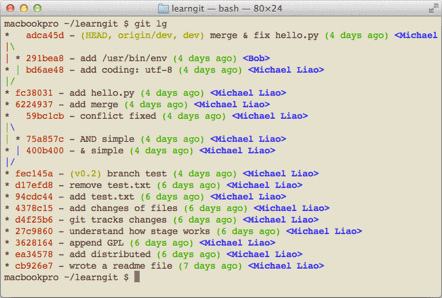
配置 Git 的时候,加上 --global 是针对当前用户起作用的,如果不加,那只针对当前的仓库起作用。
配置文件放哪了?每个仓库的 Git 配置文件都放在 .git/config 文件中:
sh
$ cat .git/config
[core]
    repositoryformatversion = 0
    filemode = true
    bare = false
    logallrefupdates = true
    ignorecase = true
    precomposeunicode = true
[remote "origin"]
    url = git@github.com:michaelliao/learngit.git
    fetch = +refs/heads/*:refs/remotes/origin/*
[branch "master"]
    remote = origin
    merge = refs/heads/master
[alias]
    last = log -1
别名就放在 [alias] 后面,要删除别名,直接把对应的行删掉即可。
而当前用户的 Git 配置文件放在用户主目录下的一个隐藏文件 .gitconfig 中:
sh
$ cat .gitconfig
[alias]
    co = checkout
    ci = commit
    br = branch
    st = status
[user]
    name = Your Name
    email = your@email.com
配置别名也可以直接修改这个文件,如果改错了,可以删掉文件重新通过命令配置,
给 Git 配置好别名,就可以输入命令时偷个懒,我们鼓励偷懒。